HomeServicesNetworking Solutions

ENTERPRISE NETWORKING SOLUTIONS

Complete LAN, Wi-Fi & Network Security for Modern Businesses

ARALAS Technology designs, installs and supports reliable business networks for small offices, large companies, factories, warehouses, institutions and multi-location organisations.

LANStructured and scalable connectivity
SecurityFirewall, VLAN and access control
Wi-FiManaged business wireless coverage
ENTERPRISE NETWORK TOPOLOGYDESIGN READY
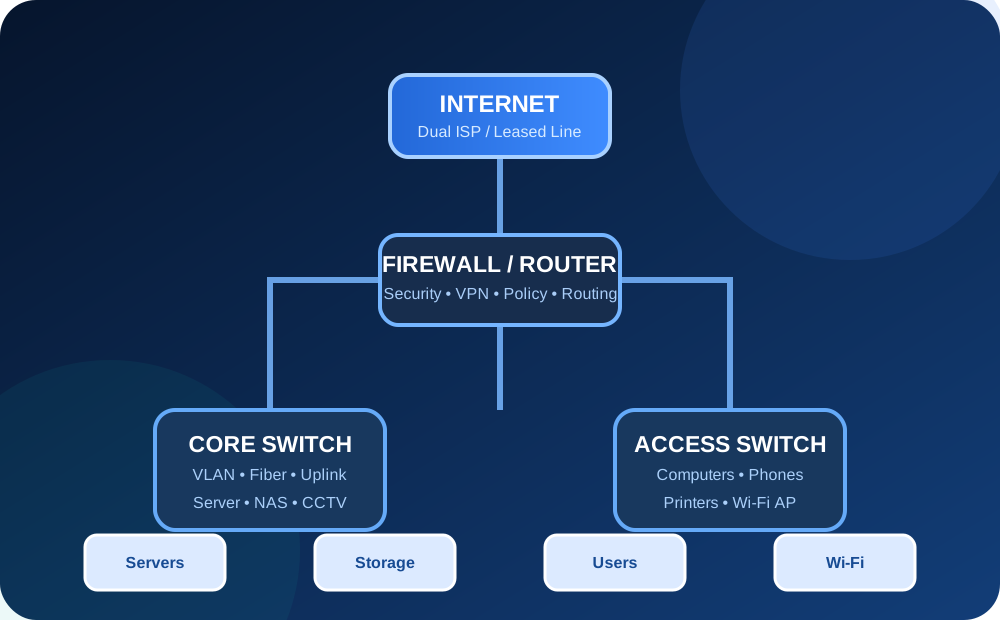
ARALAS enterprise network topology diagram
InternetSecuritySwitchingUsers
LAN & Structured CablingManaged SwitchingEnterprise Wi-FiFirewall & VPNMonitoring & Support

NETWORK CAPABILITIES

Complete Networking from One Office to Enterprise Scale

Every solution is designed according to users, applications, security, location, bandwidth and future business growth.

01

Small Office LAN Setup

Complete wired and wireless network setup for small offices, shops, clinics and professional workspaces.

  • Internet router configuration
  • Desktop and laptop connectivity
  • Shared printer and storage
  • Basic Wi-Fi security
  • Network documentation
02

Medium & Large Office Network

Structured, scalable LAN architecture for multi-department and high-user business environments.

  • Core and access-switch architecture
  • Department-wise VLAN design
  • High-speed uplinks
  • Server and storage integration
  • Redundancy planning
03

Enterprise Network Design

Complete logical and physical network planning for offices, factories, campuses and multi-floor facilities.

  • Network topology design
  • IP-address planning
  • VLAN and subnet architecture
  • Bandwidth planning
  • Future expansion capacity
04

Structured Cabling

Professional copper and fiber cabling with proper pathways, termination, labeling and testing.

  • Cat6 and Cat6A cabling
  • Fiber-optic backbone
  • Patch-panel termination
  • Rack dressing and labeling
  • Cable testing and documentation
05

Managed Switching

Configuration and management of switches for performance, segmentation, security and control.

  • VLAN configuration
  • Trunk and access ports
  • STP and loop protection
  • Link aggregation
  • PoE planning
06

Enterprise Wi-Fi

Secure managed wireless coverage for offices, warehouses, institutes and public environments.

  • Access-point placement
  • Coverage and capacity planning
  • Corporate and guest SSID
  • Roaming configuration
  • Controller or cloud management
07

Firewall & Network Security

Security policies, traffic control, segmentation and secure internet access for business networks.

  • Firewall policy design
  • Web and application filtering
  • Threat-prevention configuration
  • User and device control
  • Security logging
08

Router & Internet Management

Professional routing and internet management for single or multiple ISP connections.

  • Static and dynamic routing
  • Dual-WAN failover
  • Load balancing
  • Bandwidth management
  • Policy-based routing
08A

Firewall Load Balancing & Failover

Multi-WAN firewall architecture for internet load distribution, automatic failover, policy routing and business continuity.

  • Dual-WAN and multi-WAN load balancing
  • Automatic ISP failover
  • WAN health monitoring
  • Policy-based routing
  • Application-wise internet routing
  • Department-wise bandwidth control
  • Link priority and weighted balancing
  • Session persistence where required
  • VPN continuity planning
  • Firewall logging and alerts
09

VPN & Branch Connectivity

Secure connectivity between branch offices, remote users and central business infrastructure.

  • Site-to-site VPN
  • Remote-access VPN
  • Branch-office connectivity
  • Secure resource access
  • VPN monitoring
10

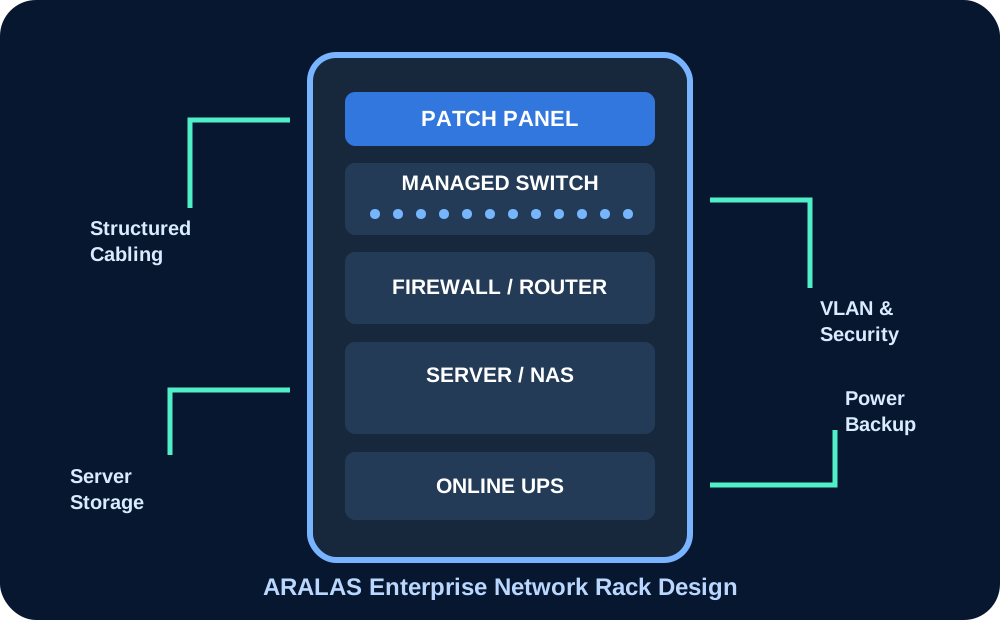
Network Rack & Data Room

Organised rack, patching, power, cooling and physical infrastructure for reliable network operation.

  • Rack size and placement planning
  • Patch-panel and switch layout
  • UPS and power planning
  • Cable management
  • Data-room documentation
11

Network Monitoring

Health, availability and performance monitoring for critical network devices and links.

  • Device availability monitoring
  • Bandwidth utilisation
  • Interface and error monitoring
  • Event and log review
  • Performance reporting
12

Network Audit & Optimisation

Assessment of existing network health, security, performance, documentation and expansion readiness.

  • Existing topology review
  • Bottleneck identification
  • Security-gap assessment
  • Wi-Fi and cabling review
  • Improvement roadmap

ENTERPRISE NETWORK ARCHITECTURE

Design Every Layer for Performance, Security and Growth

A professional network is more than connecting computers. Internet, security, switching, wireless, servers and monitoring must work together through a documented architecture.

01

Internet Edge

ISP links, leased line, WAN router, public IP and internet failover.

02

Security Layer

Firewall, VPN, threat policies, content control and secure remote access.

03

Core Network

High-speed switching, routing, fiber backbone and central network services.

04

Access Network

User systems, IP phones, printers, cameras, access points and business devices.

05

Server & Storage

Windows servers, virtualisation, NAS, backup and critical application systems.

06

Monitoring

Availability, bandwidth, logs, alerts, documentation and performance reporting.

Enterprise network rack design

FIREWALL LOAD BALANCING

Keep Business Internet Available with Multi-WAN Load Balancing and Failover

A professional firewall can distribute internet traffic across multiple ISP links, detect link failure and automatically move eligible traffic to an available connection.

Normal Operation

Both WAN links can share traffic according to configured policy and bandwidth weight.

Primary Link Failure

The firewall detects failure and routes eligible sessions through the available backup ISP.

Link Recovery

Traffic can return to the preferred WAN after health checks confirm stable connectivity.

Traffic Control

Critical users and applications can receive dedicated routing and bandwidth policies.

MULTI-WAN FIREWALLACTIVE
Firewall EngineLoad Balance • Failover • Routing • Security
Dual-WAN Load Balancing

Traffic can be distributed between two internet links according to configured weight, policy and business priority.

Automatic ISP Failover

If the primary internet link fails, eligible traffic can automatically move to the secondary connection.

Multi-WAN Architecture

More than two WAN connections can be planned where supported by the selected firewall or router platform.

Policy-Based Routing

Specific departments, users, devices or applications can be routed through selected internet links.

Bandwidth Management

Critical business traffic can receive higher priority while guest, download or non-critical traffic is controlled.

WAN Health Monitoring

Gateway, DNS or external probe targets can be monitored to identify link failure beyond the local modem.

Application-Aware Routing

Business applications, browsing, video calls, updates and backup traffic can follow different WAN policies.

Session Persistence

Where required, a session can remain on the same WAN link to reduce issues with banking, portals and authenticated applications.

VPN Continuity

Site-to-site and remote-access VPN behaviour can be planned for primary and backup internet links.

Logs & Alerts

WAN status, failover events, traffic usage and policy behaviour can be logged and reviewed.

MonitorBalanceFailoverReport
Important:Load balancing does not combine two ISP speeds into one single connection for every session. Actual behaviour depends on firewall platform, application type, session design and configured routing policy.
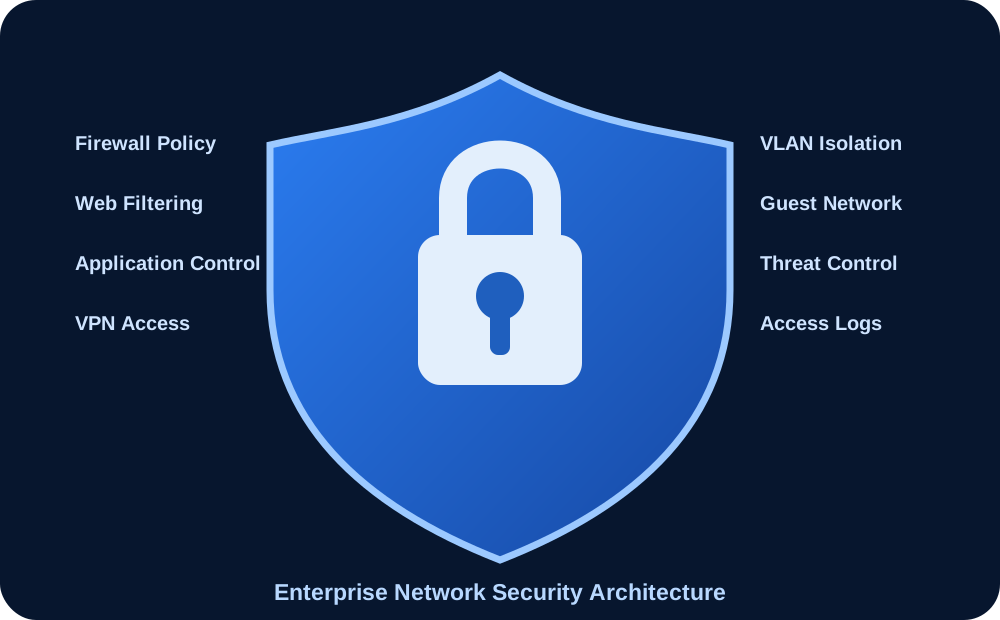
Enterprise network security architecture

NETWORK SECURITY

Protect Users, Servers, Applications and Business Data

Security policies can control internet access, isolate departments, protect internal resources and provide secure connectivity for branches and remote users.

Department-wise VLAN isolationCorporate and guest Wi-Fi separationFirewall access policiesWeb and application filteringSecure remote-access VPNSite-to-site branch VPNDevice and user access controlNetwork event and security loggingBackup configuration managementRegular firmware review
Discuss network-security requirements

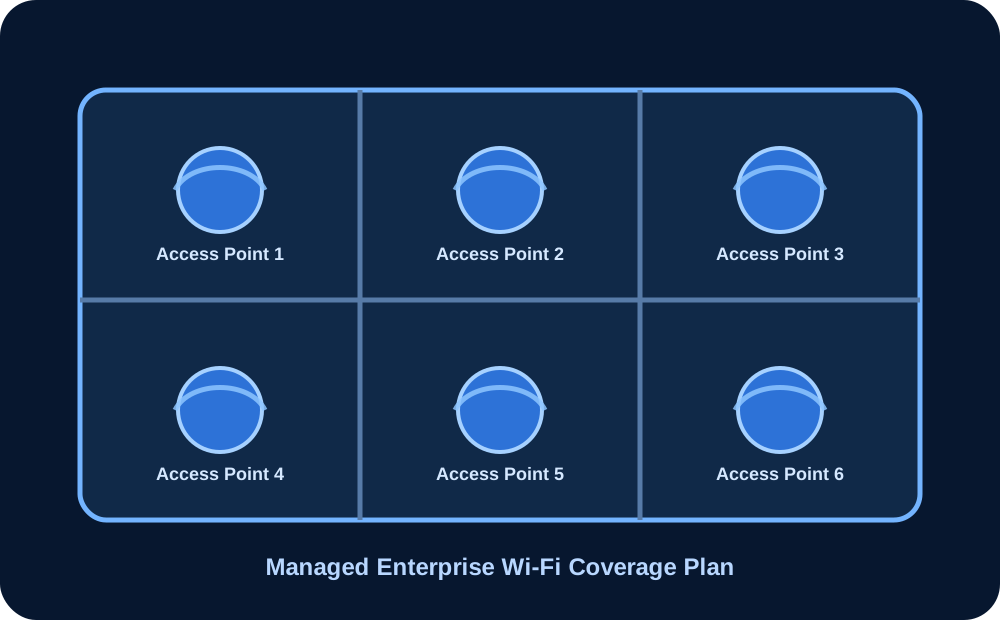
ENTERPRISE WI-FI

Reliable Wireless Coverage without Blind Spots and Congestion

Access points are planned according to floor layout, user density, walls, applications, roaming and expected device load.

Coverage

Access-point placement according to site conditions.

Capacity

User and device load considered for each coverage zone.

Security

Corporate, guest and device networks can remain isolated.

Management

Controller or cloud-managed access points where required.

Managed enterprise Wi-Fi coverage design

NETWORK EQUIPMENT

Complete Infrastructure from Internet Edge to End User

Equipment selection depends on performance, user count, availability, security and support requirements.

Internet RoutersEnterprise FirewallsManaged Core SwitchesPoE Access SwitchesWireless Access PointsWi-Fi ControllersNetwork RacksPatch PanelsCat6 / Cat6A CablingFiber ModulesOnline UPSNetwork Monitoring Server

IMPLEMENTATION PROCESS

A Documented Workflow from Site Survey to Handover

Enterprise networking projects require technical planning, structured execution, testing and proper documentation.

01

Requirement Study

Users, departments, applications, internet usage, security and future expansion are understood.

02

Site Survey

Floor layout, cable path, rack position, Wi-Fi coverage and equipment locations are assessed.

03

Network Design

Logical topology, physical topology, IP plan, VLANs, equipment and security policies are designed.

04

Commercial Proposal

Scope, equipment, services, implementation phases and commercial estimate are documented.

05

Installation

Cabling, rack, switches, firewall, Wi-Fi and network devices are installed and configured.

06

Testing & Handover

Connectivity, security, failover and performance are tested before documentation and handover.

07

Support & Monitoring

Ongoing support, configuration backup, monitoring and maintenance can be provided.

NETWORKING FAQ

Common Questions about Business Networks

Final design and equipment are selected after understanding the actual business requirement and site conditions.

Can ARALAS design the complete network for a new office?

Yes. The design can include internet links, firewall, router, switches, Wi-Fi, VLANs, structured cabling, racks, servers, CCTV connectivity and documentation.

Do you support small offices as well as large companies?

Yes. Network design is adjusted according to user count, locations, applications, security requirements and expected business growth.

Can you separate departments and guest users?

Yes. VLANs, separate Wi-Fi networks, firewall policies and access controls can be used to isolate departments, servers, CCTV, guests and other devices.

Do you configure firewall and VPN?

Yes. Firewall policies, dual-WAN, site-to-site VPN and remote-access VPN can be included depending on the selected equipment and requirement.

Can you audit an existing slow or unstable network?

Yes. Existing switches, router, firewall, cabling, Wi-Fi, IP design, bandwidth and error conditions can be assessed before recommending improvements.

REQUEST NETWORK ASSESSMENT

Planning a New Office or Facing Network Problems?

Share your location, user count, floor layout, internet requirement, security needs and existing network details.

WhatsApp