HomeServicesPhysical Server & NAS

PHYSICAL SERVER & NAS SPECIALISTS

Repair, Build and Protect Your Physical IT Infrastructure

ARALAS Technology provides deep physical server diagnosis, customised server builds, NAS repair, RAID configuration, local backup and complete rack infrastructure solutions.

PHYSICAL INFRASTRUCTURE FOCUSTower servers, rack servers, NAS, RAID, local backup and offline backup systems.
ServerRepair and customised physical builds
NASRAID storage and controlled file access
BackupLocal, offline and verified restoration
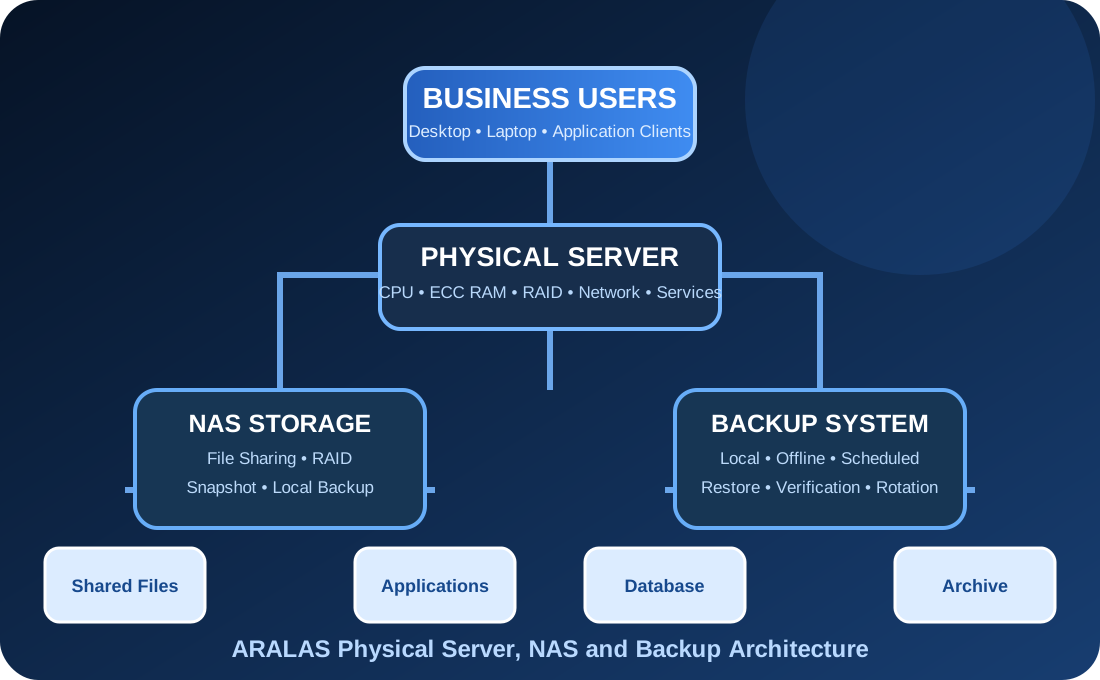
PHYSICAL INFRASTRUCTURE ARCHITECTUREON-PREMISES
Physical server NAS and backup architecture
ServerNASRAIDBackup
Physical Server RepairCustom Server BuildNAS & RAIDLocal BackupRack & Power

SERVER & NAS CAPABILITIES

Complete Physical Infrastructure from Component to Backup

Every solution is planned around workload, reliability, usable storage, performance, repairability and future expansion.

01

Physical Server Diagnosis

Deep diagnosis of server power, motherboard, CPU, memory, RAID, storage, cooling and network components.

  • No-power and boot diagnosis
  • POST and hardware error review
  • Motherboard and power-rail assessment
  • Temperature and fan inspection
  • Event-log and hardware-health review
02

Server Motherboard Repair Assessment

Technical inspection of server boards, sockets, slots, controllers, power sections and onboard interfaces.

  • CPU socket and pin inspection
  • ECC memory-slot diagnosis
  • BIOS and firmware assessment
  • Onboard LAN and storage controller checks
  • Board-level repair feasibility
03

CPU & ECC Memory

Processor, CPU socket, ECC RAM and memory-channel assessment for stability and performance.

  • Single and dual-CPU configuration
  • ECC UDIMM, RDIMM and LRDIMM
  • Memory-channel population
  • Thermal and stress testing
  • Capacity and compatibility planning
04

RAID & HBA Configuration

RAID controller, HBA, cache, battery, firmware and disk-array configuration.

  • RAID 0, 1, 5, 6 and 10
  • Hardware RAID configuration
  • HBA and passthrough setup
  • Cache and battery health
  • Array rebuild monitoring
05

SAS, SATA & NVMe Storage

Enterprise storage selection and configuration according to workload, capacity and reliability requirements.

  • SAS HDD and enterprise SSD
  • SATA HDD and SSD
  • NVMe storage
  • Hot-swap drive bays
  • Drive health and performance testing
06

Backplane & Hot-Swap Bays

Diagnosis of storage backplanes, drive caddies, connectors, expanders and hot-swap detection problems.

  • Drive bay detection
  • Backplane power and signal
  • SAS expander assessment
  • Caddy and connector condition
  • Disk-slot mapping
07

Redundant Power & Cooling

Assessment of server PSUs, fan modules, airflow, temperature and power redundancy.

  • Redundant PSU diagnosis
  • Fan-module testing
  • Thermal-zone assessment
  • Airflow and rack clearance
  • UPS and power-load planning
08

Custom Physical Server

Purpose-built physical server configuration according to application, users, storage and budget.

  • Tower and rack server design
  • CPU and memory sizing
  • Storage and RAID planning
  • Network-interface selection
  • Future expansion capacity
09

File & Application Server

Physical server configuration for file sharing, business applications, database and user access.

  • File and folder permissions
  • Shared application hosting
  • Database storage planning
  • User and department access
  • Local backup integration
10

Active Directory Server

Physical Windows Server deployment for domain users, policies, authentication and central administration.

  • Domain Controller setup
  • DNS and DHCP integration
  • Users and groups
  • Group Policy configuration
  • Local backup and recovery planning
11

NAS Repair & Diagnosis

Diagnosis of NAS motherboard, power supply, disks, bays, RAID, network interfaces and operating condition.

  • NAS boot and power issues
  • Disk and bay detection
  • RAID degraded condition
  • Network and permission problems
  • Firmware and configuration review
12

Custom NAS Solution

Customised NAS design for file sharing, archive, local backup, department access and large storage.

  • 2-bay to large multi-bay design
  • RAID selection
  • 1 GbE, 2.5 GbE and 10 GbE
  • User and folder permissions
  • Capacity expansion planning
13

Local Backup Server

Dedicated physical backup server for scheduled backups, version retention and fast restoration.

  • Backup schedule
  • Folder and server backup
  • Retention policy
  • Restore testing
  • Backup-health reporting
14

Offline Backup Rotation

Physically separated backup copies for protection from accidental deletion, ransomware and hardware failure.

  • External-disk rotation
  • Offline backup copy
  • Weekly and monthly retention
  • Backup verification
  • Secure storage procedure
15

Server Rack & Infrastructure

Professional rack, cabling, UPS, network, cooling and physical infrastructure planning.

  • Rack size and layout
  • Patch panel and switching
  • Power distribution
  • UPS and battery backup
  • Cable management and labeling
16

Server AMC & Health Monitoring

Preventive physical server and NAS support with health inspection, reporting and priority response.

  • Hardware-health checking
  • RAID and disk monitoring
  • Backup verification
  • Temperature and power review
  • Preventive maintenance report

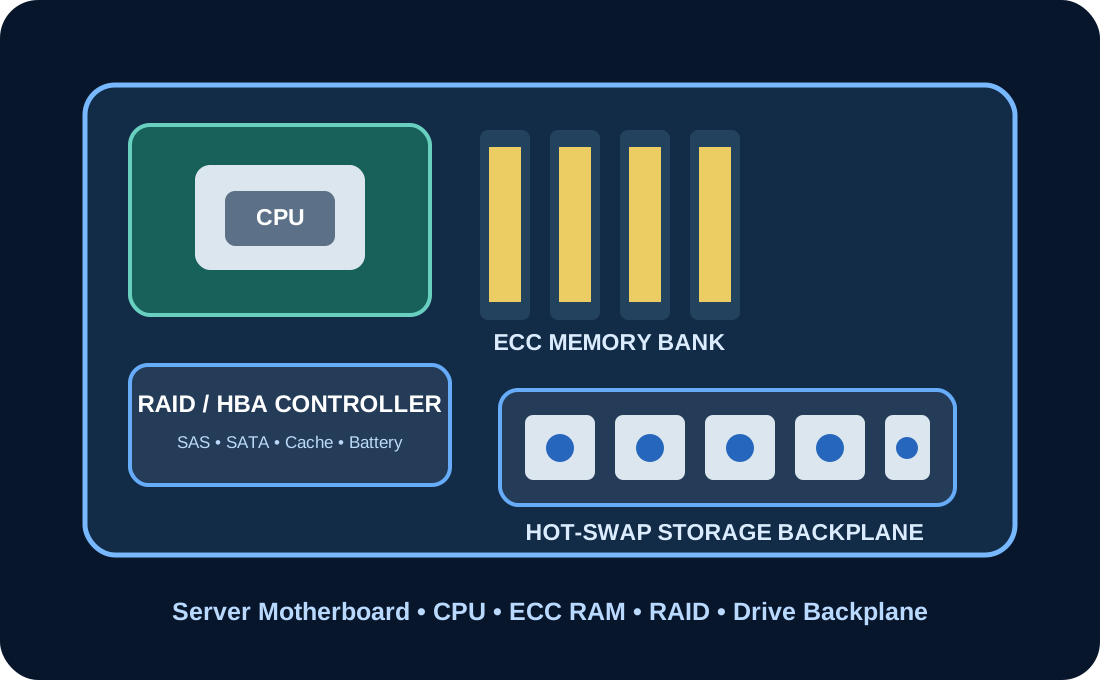
DEEP SERVER HARDWARE

Diagnose Every Critical Physical Component

Server repair requires structured diagnosis of the motherboard, CPU, ECC memory, RAID controller, storage backplane, power and thermal systems.

Server MotherboardSingle / Dual CPUECC RAMRAID ControllerHBA ControllerSAS BackplaneHot-Swap BaysEnterprise HDDEnterprise SSDNVMe StorageRedundant PSUFan Modules10 GbE Network CardRemote Management PortRack RailsOnline UPS
Physical server hardware components
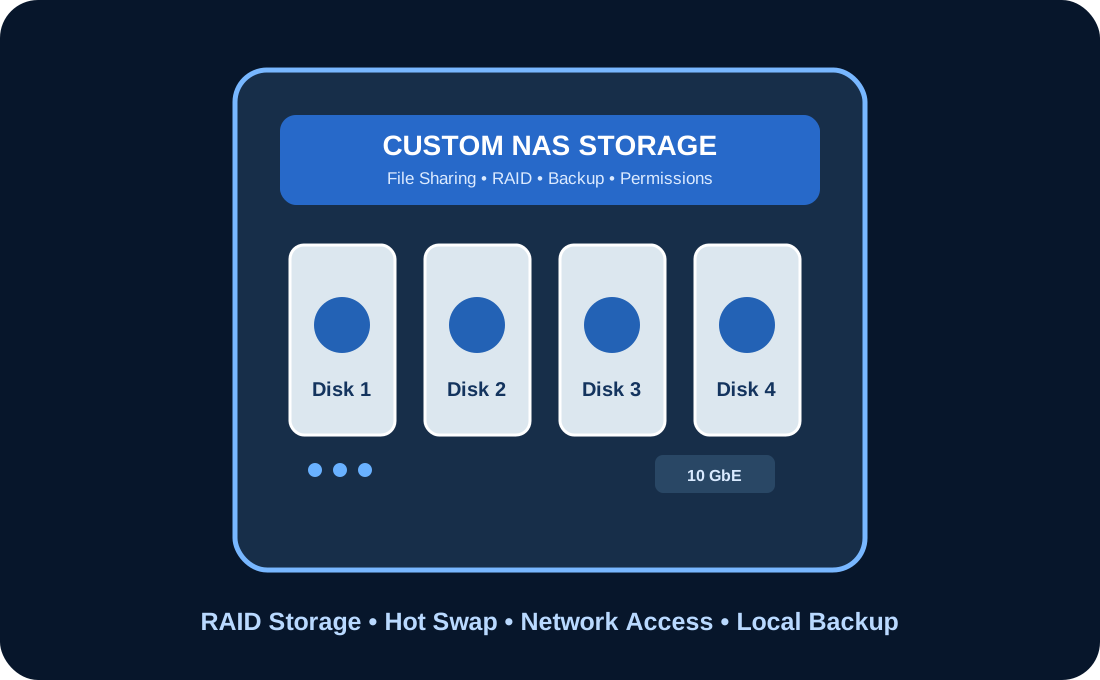
Custom NAS storage solution

CUSTOM NAS SOLUTIONS

Centralised Physical Storage Designed Around Your Business

NAS configuration can be customised for department sharing, business data, high-capacity storage, backup and controlled multi-user access.

Department File Storage

Separate shared folders and permissions for accounts, HR, technical, management and other departments.

Central Business Data

Central location for office documents, projects, reports and application data.

Local Backup Repository

Scheduled backup destination for computers, physical servers and shared data.

CCTV Archive Storage

Storage extension or archive planning for surveillance data where technically suitable.

Large Media Storage

High-capacity shared storage for design, video, engineering and media files.

Multi-User Access

Controlled simultaneous access through SMB, NFS or other supported file protocols.

RAID ARCHITECTURE

Select RAID According to Performance, Capacity and Fault Tolerance

RAID selection depends on disk count, workload, rebuild time, usable capacity and required availability.

01

RAID 0

Performance

Data striping without redundancy. Disk failure can cause complete data loss.

02

RAID 1

Mirroring

Two-drive mirror commonly used where simple redundancy is required.

03

RAID 5

Capacity + Parity

Single-disk fault tolerance with usable-capacity balance.

04

RAID 6

Dual Parity

Two-disk fault tolerance for larger arrays and longer rebuild periods.

05

RAID 10

Performance + Redundancy

Mirroring and striping combined for demanding physical workloads.

Important:RAID provides disk availability but is not a replacement for a separate verified backup.

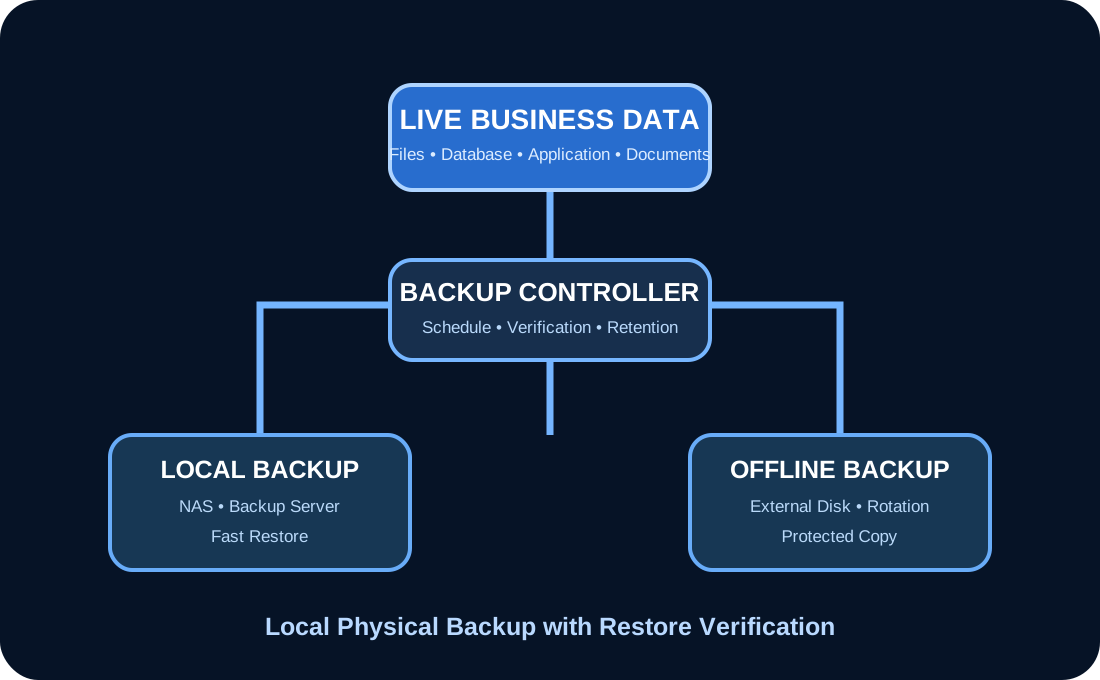
PHYSICAL BACKUP STRATEGY

Keep Local Data Recoverable through Multiple Physical Copies

Backup planning includes schedules, retention, local backup, offline copies, restoration testing and responsibility documentation.

Daily scheduled backupWeekly full backupLocal NAS or backup serverOffline external-disk copyBackup rotation processRetention and version policyRestore verificationBackup failure reporting
Physical local and offline backup strategy

IMPLEMENTATION WORKFLOW

A Technical Process from Assessment to Physical Handover

Server and NAS work is completed through hardware assessment, capacity planning, testing and documented handover.

01

Requirement Study

Application, users, data size, workload, retention and availability requirements are understood.

02

Hardware Assessment

Existing server, NAS, disks, RAID, power, cooling and rack infrastructure are inspected.

03

Capacity Planning

CPU, ECC memory, usable storage, RAID, network and backup capacity are calculated.

04

Physical Design

Tower or rack hardware, drive layout, controllers, network and power are documented.

05

Build & Configuration

Hardware is assembled or repaired, firmware is reviewed and storage is configured.

06

Testing

Memory, CPU, disks, RAID, temperature, network, backup and restore are tested.

07

Handover & Support

Configuration, credentials, storage layout, backup process and maintenance recommendations are handed over.

SERVER & NAS FAQ

Important Questions about Physical Infrastructure

Final repair, parts, storage and RAID recommendations are confirmed after inspecting the actual hardware and data condition.

Do you repair physical servers and NAS devices?

Yes. Diagnosis can cover power, motherboard, CPU, memory, controller, backplane, storage, cooling, network and configuration problems. Final repair depends on condition and parts availability.

Can you build a customised physical server?

Yes. A tower or rack server can be designed around application workload, user count, storage, RAID, network speed, redundancy and budget.

Do you provide cloud backup?

This service page focuses on physical on-premises servers, NAS, local backup servers and offline backup copies.

Is RAID itself a complete backup?

No. RAID improves disk availability but does not replace a separate backup. A deleted, corrupted or encrypted file can affect the RAID array as well.

Can you recover a degraded RAID array?

A degraded array can be assessed, but no rebuild should be attempted without checking drive health, controller status and backup availability.

Can NAS permissions be configured department-wise?

Yes. Shared folders, users, groups and permissions can be designed according to departments and business roles.

REQUEST PHYSICAL SERVER ASSESSMENT

Need Server Repair, Custom NAS or a Reliable Local Backup System?

Share the server model, problem, user count, application, storage requirement, RAID status and required backup capacity.

WhatsApp