HomeServicesThin Client & Virtualisation

ON-PREMISES CENTRAL COMPUTING

Thin Client, NComputing, vCloudPoint and RDS Solutions

ARALAS Technology designs centralised computing environments with physical servers, thin clients, zero clients, Windows RDS, local printing, shared applications and centralised business data.

LOCAL PHYSICAL INFRASTRUCTUREPhysical server, LAN, local NAS, local printers and on-premises user data.
RDSCentral desktop and RemoteApp
PrintingLocal and network printers
DataCentral server and NAS storage
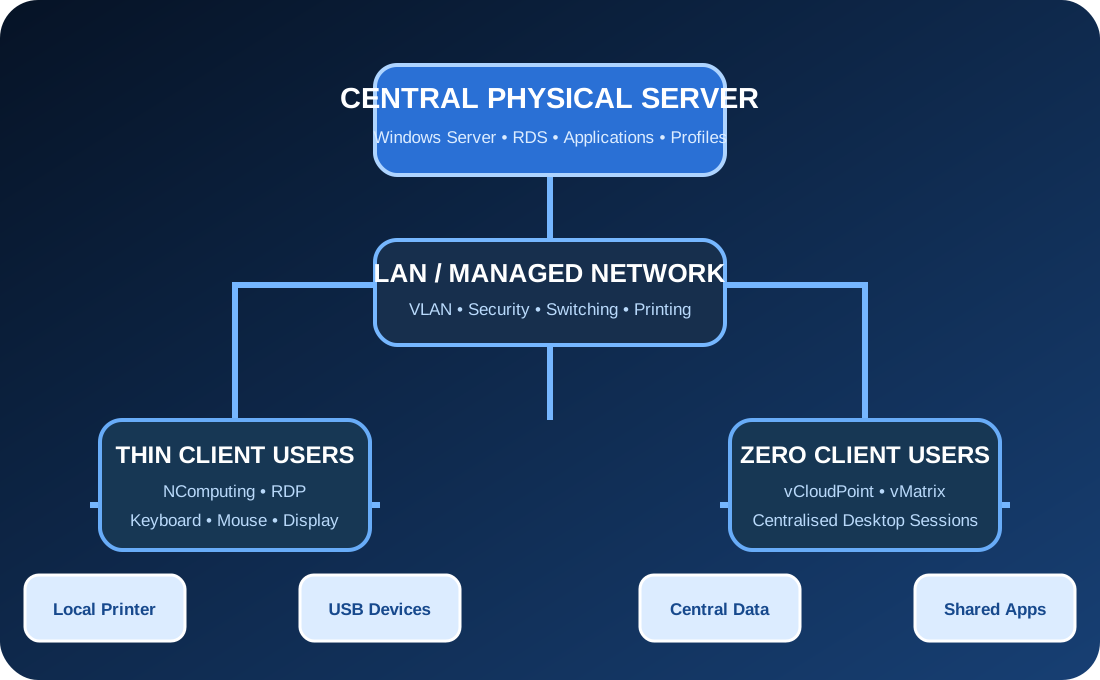
CENTRAL COMPUTING ARCHITECTUREON-PREMISES
Thin client central computing architecture
ServerRDSEndpointsData
NComputingvCloudPointWindows RDSLocal PrintingCentralised Data

THIN CLIENT CAPABILITIES

Complete Central Computing from Endpoint to Physical Server

The complete environment includes endpoint hardware, Windows sessions, applications, printing, profiles, data, network and backup.

01

NComputing Solutions

Deployment, configuration and support of NComputing endpoints for centralised multi-user desktop environments.

  • NComputing endpoint installation
  • vSpace or RDP environment assessment
  • Device registration and management
  • Display, keyboard and mouse setup
  • User-session troubleshooting
02

vCloudPoint Solutions

Zero-client deployment with centrally hosted Windows sessions and unified endpoint configuration.

  • vCloudPoint device deployment
  • vMatrix Server Manager setup
  • User and device configuration
  • USB and peripheral assessment
  • Session-performance optimisation
03

Windows RDS Thin Clients

Windows Server Remote Desktop Services for centralised desktops, published applications and controlled user access.

  • RD Session Host configuration
  • RD Licensing setup
  • User and device CAL planning
  • Remote Desktop and RemoteApp
  • Group Policy configuration
04

Centralised Desktop Environment

Standardised user desktops delivered from a central physical server through the business LAN.

  • Common desktop configuration
  • User-specific login
  • Application access control
  • Desktop and Start Menu policies
  • Central update management
05

Published Business Applications

Business applications can be delivered as full desktops or individual RemoteApp programs.

  • Accounting application publishing
  • ERP and office application access
  • RemoteApp deployment
  • Application permission control
  • User-wise application availability
06

Local Printer Redirection

Local USB and network printing configuration for users working inside central RDP sessions.

  • Local USB printer assessment
  • RDP printer redirection
  • Remote Desktop Easy Print
  • Network-printer mapping
  • Default printer assignment
07

Central Print Server

Centralised printer deployment for departments, branches and multi-user server environments.

  • Printer sharing
  • Department-wise printer mapping
  • Driver management
  • User and group permissions
  • Print troubleshooting
08

Centralised User Data

Documents and business data remain on the physical server or NAS instead of individual endpoint devices.

  • User home folders
  • Department shared folders
  • Central document storage
  • User-wise permissions
  • NAS and file-server integration
09

User Profile Management

Controlled user profiles, Desktop, Documents, settings and access policies for multi-user sessions.

  • Profile folder planning
  • Desktop and Documents redirection
  • Profile-size control
  • Login-performance optimisation
  • Profile repair and cleanup
10

USB & Peripheral Redirection

Assessment and configuration of supported USB drives, scanners, biometric devices and peripherals.

  • USB storage redirection
  • Scanner compatibility checking
  • Barcode-device assessment
  • Biometric-device integration
  • RDP policy configuration
11

Multi-User Server Sizing

Physical server resources designed according to concurrent users, applications and workload.

  • CPU core planning
  • ECC RAM sizing
  • SSD and RAID design
  • Network-capacity assessment
  • Concurrent-user planning
12

LAN & Network Design

Reliable LAN architecture for thin clients, central servers, printers and shared storage.

  • Managed switching
  • Thin-client VLAN
  • Server and NAS connectivity
  • Gigabit network design
  • Structured cabling
13

Domain & Group Policy

Centralised authentication, policies and restrictions through Active Directory and Group Policy.

  • Domain user login
  • User and security groups
  • Desktop restrictions
  • Drive and printer policies
  • Application-control policies
14

Local Server & NAS Backup

Central server data, user folders and application files protected through physical local backup.

  • Scheduled server backup
  • NAS backup repository
  • Offline backup rotation
  • User-folder backup
  • Restore verification
15

Performance Troubleshooting

Diagnosis of slow login, session freezing, printing, profile and application-performance issues.

  • CPU and memory analysis
  • Disk latency assessment
  • Network and RDP performance
  • Profile login delays
  • Application-session diagnosis
16

Thin Client AMC

Preventive support for endpoints, physical servers, RDS, printers, profiles and central data.

  • Endpoint health checking
  • Server resource review
  • Printer and peripheral testing
  • Backup verification
  • User and session support

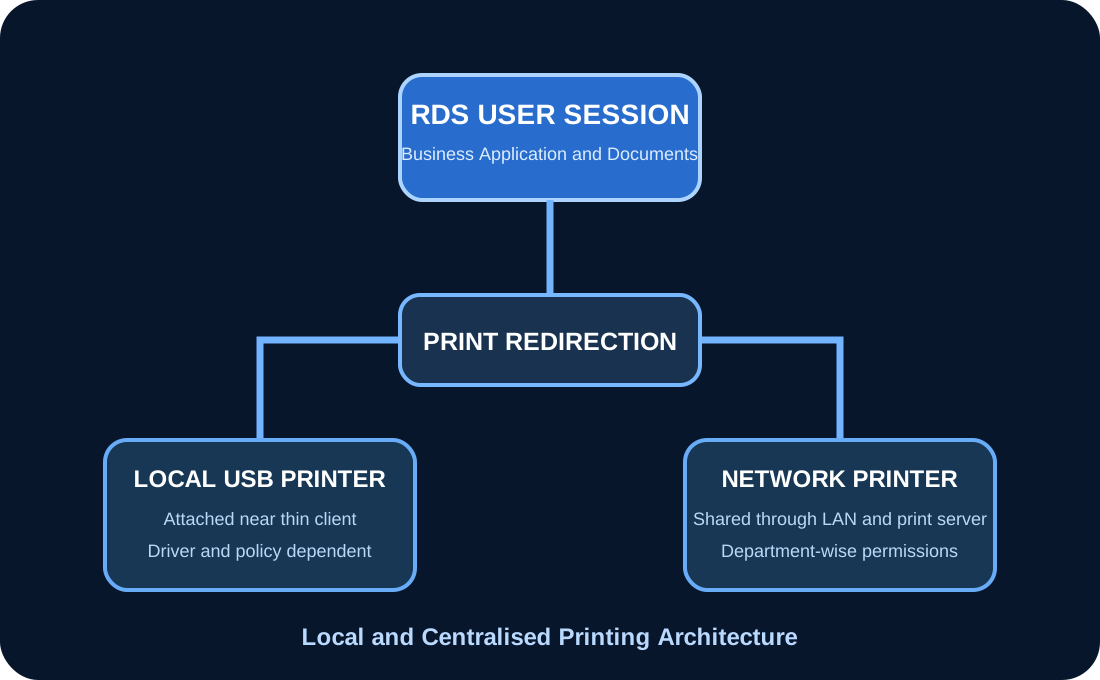
LOCAL & NETWORK PRINTING

Print from Central Sessions to the Correct Local Printer

Printer deployment can include USB printer redirection, network printers, print-server mapping, department permissions and default printer management.

RDP printer redirectionRemote Desktop Easy PrintUSB printer compatibilityNetwork printer deploymentPrint-server configurationDepartment printer mappingDefault printer policyDriver troubleshooting
RDP local printing architecture
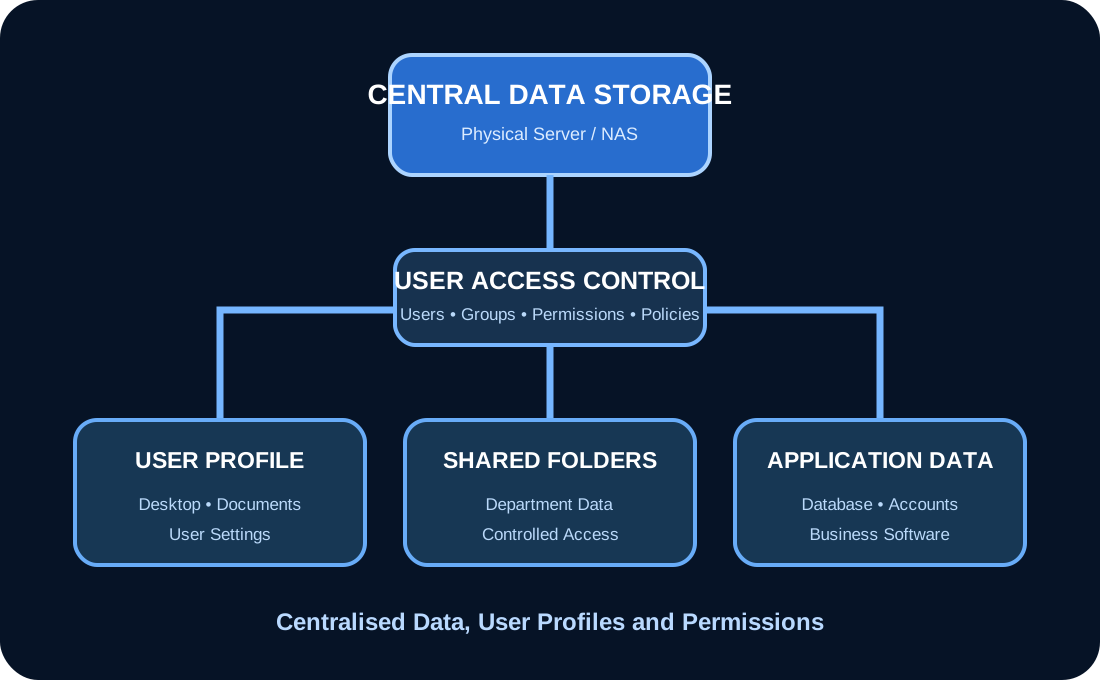
Centralised user data architecture

CENTRALISED DATA

Keep Business Files on the Physical Server or NAS

Central storage reduces dependency on individual endpoint devices and allows controlled permissions, shared access, structured backup and easier management.

User Home Folders

Private folders for individual users.

Department Shares

Common data for accounts, HR, management and technical teams.

Application Data

Central data for business and accounting applications.

Local Backup

Scheduled NAS and offline backup copies.

SUITABLE ENVIRONMENTS

Central Computing for Repetitive, Controlled Business Workloads

Schools & Computer Labs

Centralised desktops for classrooms, labs, libraries and training environments.

Accounts & Billing Offices

Multi-user access to accounting, billing, payroll and business applications.

Factories & Warehouses

Controlled endpoints for ERP, inventory, dispatch and production users.

Hospitals & Clinics

Central access to hospital, billing and administrative applications.

Call Centres

Standardised desktops and controlled applications for many users.

Corporate Offices

Centralised user management, applications, data and printing.

IMPLEMENTATION WORKFLOW

Test Compatibility before Full Deployment

01

User & Application Study

Concurrent users, applications, printing, USB devices and performance requirements are recorded.

02

Compatibility Assessment

Applications, printers, scanners, endpoint devices and licensing requirements are checked.

03

Server Sizing

CPU, ECC RAM, RAID storage, network and backup capacity are calculated.

04

Pilot Deployment

A limited-user pilot is tested before full production deployment.

05

User Rollout

Endpoints, accounts, profiles, applications and printers are configured.

06

Testing & Handover

Login, application, printing, data access, USB and backup are verified.

Important:Application, printer, USB device and licensing compatibility must be verified through a pilot before a large thin-client rollout.

THIN CLIENT FAQ

Important Questions before Deployment

Final server sizing and endpoint selection depend on users, applications, printers, peripherals and concurrent workload.

Can local printers work with an RDP thin client?

Yes, where the endpoint, printer driver and RDP policies support redirection. Network printers can also be deployed centrally.

Will every application work in a multi-user RDS environment?

Not necessarily. Application licensing, multi-user compatibility, database design and vendor support must be checked before deployment.

Where will user data be stored?

User folders and shared business data can be stored centrally on the physical server or NAS with controlled permissions and backup.

Do RDS users require licences?

Windows Server RDS environments require valid Windows Server licensing and appropriate RDS user or device CALs.

Can USB scanners or biometric devices work?

Compatibility varies by endpoint, protocol, driver and application. Testing is required before committing to deployment.

REQUEST CENTRAL COMPUTING ASSESSMENT

Planning NComputing, vCloudPoint or Windows RDS?

Share the user count, applications, printers, USB devices, data size and required endpoint model.

WhatsApp